
Top 5 strategies for using video in the primary classroom
Published on 6 min read
Written byBrendan Mitchell
In this guide
After the rollercoaster year that was 2020, we’ve learned a few things about using video as a tool for teaching and learning in the primary classroom. Let’s explore the top 5 ways video can be used to provide value in the classroom.
1) Multiply yourself
Do you have a particular skill or technique you need to demonstrate to your students? Do you have some students who may need to watch a demonstration several times, but you have to move on to the main activity? This could be:
- Handwriting techniques
- Math strategies
- Science experiments
- Exercise or sport skills
- Art techniques
You can ‘multiply yourself’ by using video to:
- Find an existing, instructional video within the ClickView primary library
- Create your own quick video
Record a demonstration once and you have it forever
The benefits of sharing a video with students include:
- Freeing up your time to work with different groups of students
- Ability to observe your class more closely
- Students can re-watch the video as many times as they need
- Students can access the learning even if they missed class that day
- Students can view the video at home and then have more time in class to apply the skill and ask questions
- Add the video to your school’s library so other teachers and students can benefit
Don’t know where to start with making videos? We have supportive content to help you:
- View this excellent series we produced with Steven Kolber on making instructional videos.
- Teaching Online Masterclass – bite-sized videos from experienced educators, academics and industry professionals
Remember, your videos do NOT need to be perfect whizz-bang Hollywood productions to provide value to your students.
2) Create consistency for assessment
Most schools utilise assessment tasks across a whole year level as they can be indicative of student progress. Achieving consistency can often be challenging when the task is being explained multiple times.
So whether you are the only stage 3 teacher or one of four year 5 teachers, why not use a video to explain the task at hand.
Create one source of truth for your assessment
Strategies for using video when assessing:
- Record and upload your own video with an explanation of the task and marking rubric
- Share your video with the students for them to use as a source of truth
- Make your video interactive and include annotations for students who need a written explanation
- Include a short answer question at the end of your video. Students can submit comments or questions on points they need clarifying
3) Make the most of face-to-face time
There were many challenges for those states who were teaching remotely, including how to productively use the time you had with your students. We only get limited face-to-face time with our students, so we need to consider how to effectively use that time.
Thinking about teaching from the perspective of Bloom’s Taxonomy, do students need more support with either; remembering and understanding or applying and synthesizing?
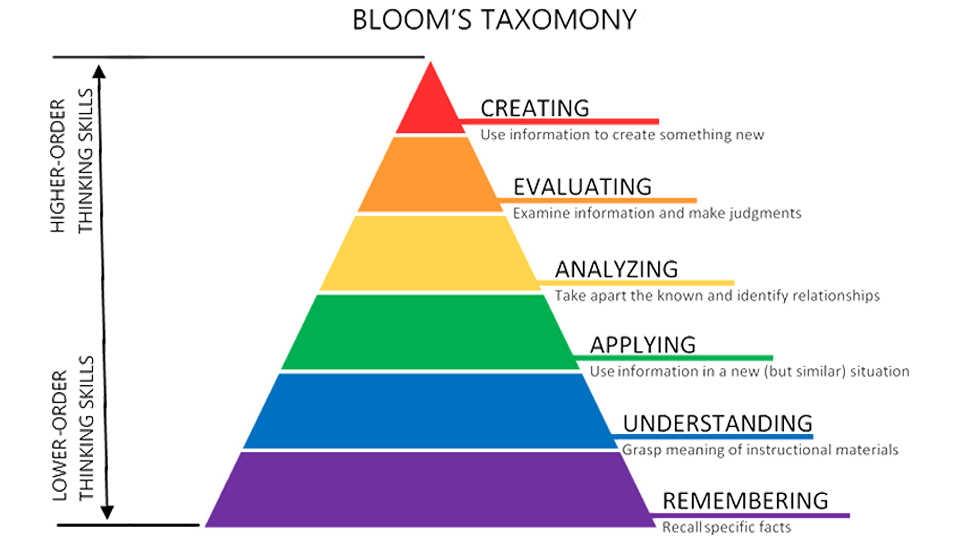
The ‘remember and understanding’ components of Bloom’s Taxonomy is not considered the most effective use of our time with students – either in the class or on a video call.
Why not find a relevant, curriculum-aligned video within ClickView, and depending on your context you can either:
- set expectations that when students come to class, they have already engaged with the explicit teaching and are ready to start applying and practising the skills or knowledge.
- begin the lesson with students cosying up to their device to engage with the instructional video – with headphones of course!
Using an engaging video at the beginning of the lesson will enable you to spend more time supporting your students to use their critical skills such as; apply, analyse and evaluate.
Check out our ClickView Miniclips series for some fantastic educational videos on all different topics produced specifically for Primary students!

There will always be reasons why these strategies may not work for your class, but if you invest some time in developing the routines and habits in your students, they will learn and adapt to them.
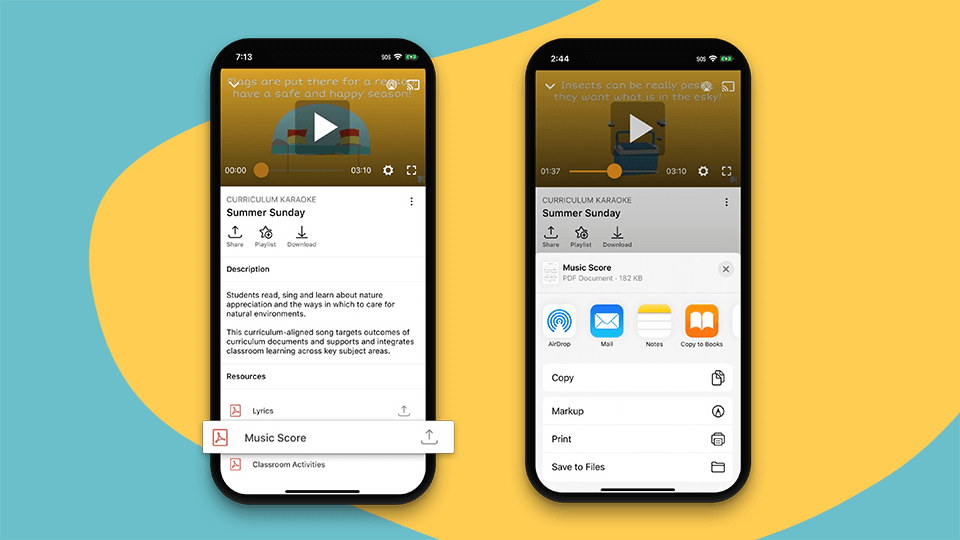
Tip: The ClickView app for iPhone, iPad and Android has a download for offline viewing function which is great if internet access is unstable at your school.
4) Own your professional development
I have mixed feelings about lesson observations. They can, when implemented well, be incredibly valuable. However, they are often invalid for one reason. The moment students realise another teacher is in the room, the dynamic changes as they modify their words and actions – for better or worse.
An alternative to having your mentor in the class:
- Record your lesson
- Upload the recording to ClickView
- Clip the video to highlight only the agreed-to section of the lesson
- Share it with your mentor
- Work through the feedback and learnings.
Benefits include:
- Reviewing the recording yourself or with a mentor can make the feedback more valuable as you can see and hear the specific details
- Comparing this with future lesson recordings to see differences and make improvements
- Being less nervous during the lesson as you don’t have your supervisor or mentor physically in the room with you
For more support and guidance on developing your teaching practice, take some time to view our Teacher Professional Development videos in the primary library. Educators and professionals have created videos to help teachers to learn and deal with a range of topics or issues they may face in the classroom.
These include:
5) Make video active
My memory of video as a student is from year five when Mr. Davies would wheel in the giant box that was a TV back in the early 90s on a trolley with a VCR, put in a VHS, press play, and we would watch Behind the News. It was the best part of the week. Friday afternoon, after lunch, lights off, TV on…my brain went into weekend mode.
I look back at that now as a trained teacher and can see so many opportunities to strengthen those times due to technology that Mr. Davies didn’t have.
Don’t have students watch a video. Have them engage with a video.
Mr Davies may have used videos a lot (even outside Behind the News), but we were watching them, passively. ClickView’s interactive videos allow you to turn passive watching into active engagement by selectively adding questions at specific points within a video.
The question you need to ask is what am I actually trying to achieve with this video?
- Are you consolidating prior learning?
- Are you driving classroom conversation with targeted and pre-planned questions in a video at the front of the room?
- Are you checking for understanding mid-way through a unit?
- Is it something else?
Once you’ve answered that, you simply need to come up with your questions and insert them into the video at the right points.
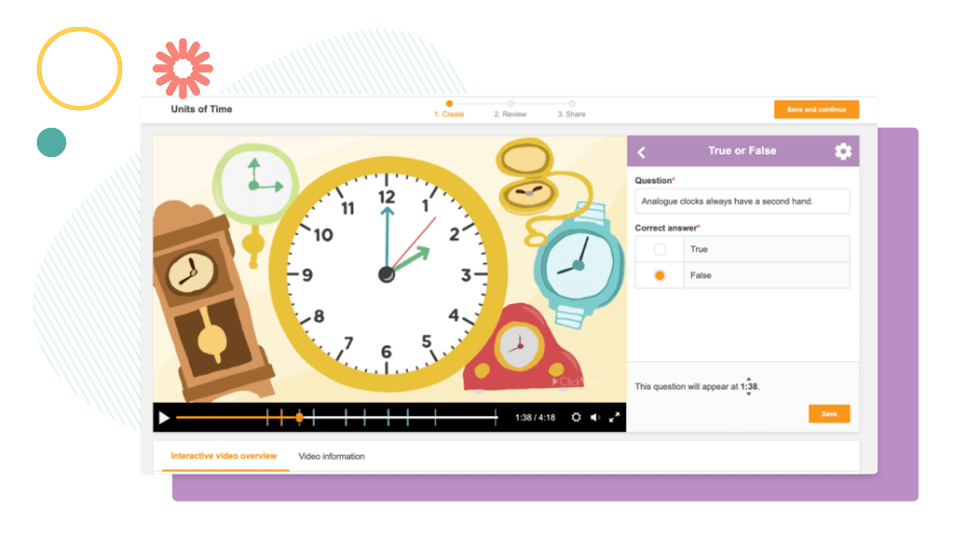
If you’ve never used our interactive videos, check out this video for everything you need to know: Using Interactive Video to Improve Student Engagement
Video is a teaching and learning tool, just like pens, notebooks, textbooks, and your interactive whiteboard. Whether it is an effective tool comes down to how you utilise it.
If you want to book some training for you and your colleagues, please reach out to your school’s ClickView Advisor or email info@clickview.com.au and they will be able to book something in on your behalf.
Join over 4,900 schools using ClickView to enhance teaching and learning
Get a free school evaluation today. Find out how the ClickView team can help support your school to use video for deeper engagement and subject understanding.
Share to
Other posts



Want more content like this?
Subscribe for blog updates, monthly video releases, trending topics, and exclusive content delivered straight to your inbox.