
ClickView videos are now available in Monarch
Published on 3 min read
Teachers and librarians using Monarch can now find ClickView videos directly in Monarch search, alongside books, eBooks, and other resources, without switching.
What’s new
ClickView has integrated with Monarch, a digital content discovery engine used by schools, districts, and Boards of Cooperative Educational Services (BOCES) in New York State and across the country. If your school or district subscribes to both ClickView and Monarch, ClickView videos now appear directly in Monarch search, alongside other library resources.
This means:
- ClickView videos surface in Monarch search results next to other resources
- Teachers can search once and find videos, books, eBooks, and articles in one place
- Selecting a ClickView video takes you straight to ClickView, where interactive quizzes, playlists, and standards-aligned resources continue as normal
Nothing changes within ClickView itself. The integration makes it easier to discover ClickView videos through a system that schools already use.
Why Monarch
Teachers already search across multiple places to find the right resources. Adding another workflow slows them down. That’s why integrating with the systems schools already use is a priority for ClickView.
Monarch is a digital content discovery engine provided by Alexandria Library Automation, designed for schools and districts. It brings together resources from across a school’s subscriptions into a single search, so teachers can find what they need faster in one place. By integrating with Monarch, ClickView videos now appear right where teachers are already looking.
No configuration is needed on the ClickView side. Schools that already use Monarch can access ClickView videos in a familiar place, with no extra steps.

“Teachers shouldn’t have to search in multiple places to find the right video for their lesson. Integrating with systems like Monarch means ClickView videos are right where they already work, saving them time and making it easier to bring high-quality video into the classroom.” – Edward Filetti, CEO, ClickView
How it works
Here’s what the integration looks like in practice:
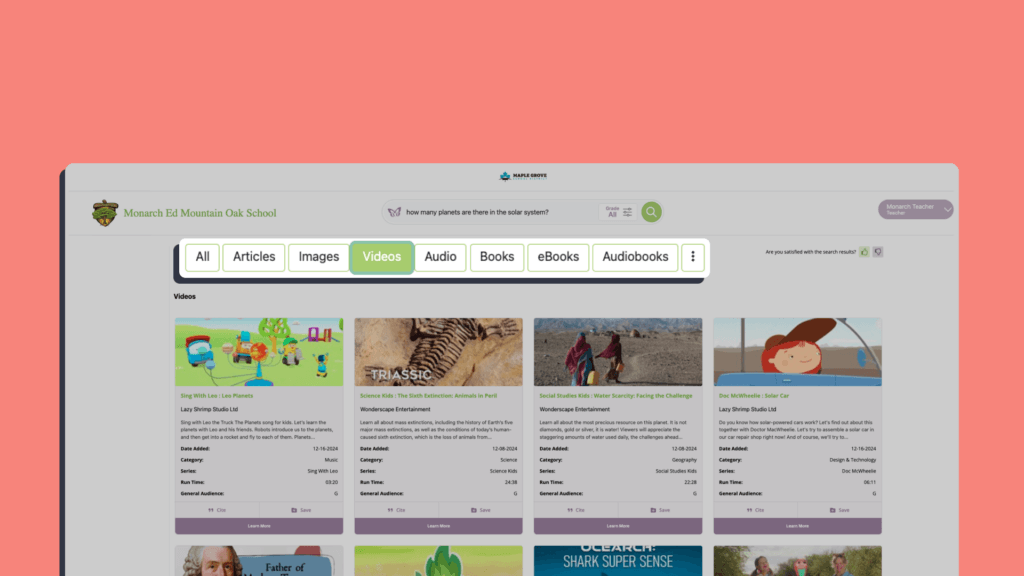
- A teacher or librarian opens Monarch and searches for a topic, for example, “How many planets are there in the solar system?”
- Monarch returns results from all the school’s subscribed providers, including ClickView
- The teacher filters by format (articles, images, videos, eBooks, audiobooks) to narrow results
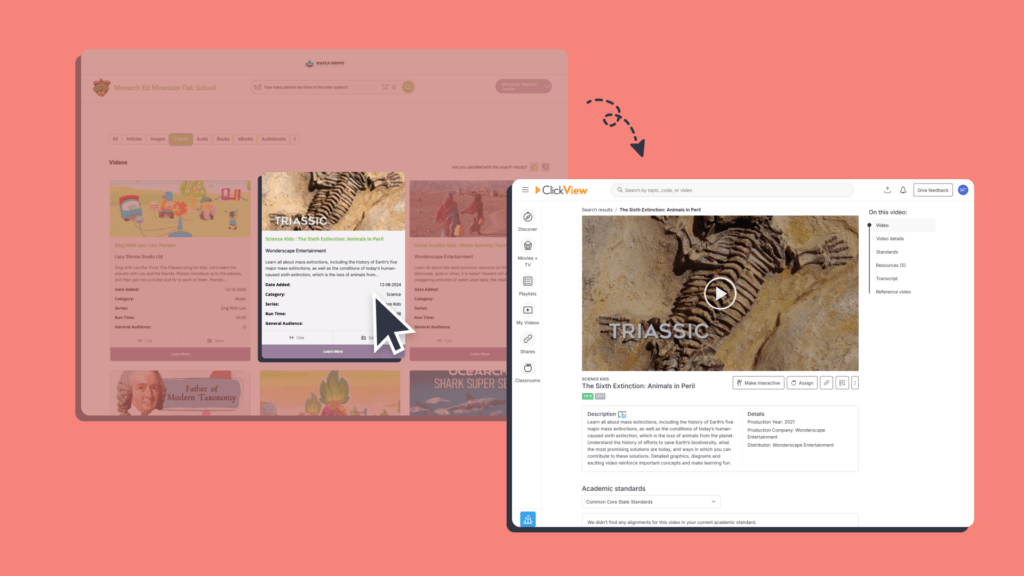
- When they select a ClickView video, they’re taken directly to that video on ClickView
- From there, they can access the full ClickView experience with interactive quizzes, downloadable worksheets, playlists, and more.
For more details, visit our help center article.
What this means for your school
For teachers and librarians: Find ClickView videos in the same place you already search for everything else. No separate login, no extra steps. You also keep the freedom to go directly to ClickView whenever you prefer. The integration is there when it’s useful, not instead of what already works.
For school and district leaders: Using Monarch doesn’t change how teachers access ClickView. Teachers can still go straight to ClickView as they always have. For schools that want to streamline discovery, Monarch brings ClickView videos into a single search alongside books, eBooks, and other resources. Your school chooses what works best.
For administrators: There’s nothing to set up on the ClickView side. Contact your Monarch account manager to request the integration. Once enabled, ClickView videos appear in Monarch search automatically.
Getting started
If your school or district subscribes to both ClickView and Monarch:
- Email your Monarch account manager or email sales@goalexandria.com and request the ClickView integration
- Once enabled, ClickView videos appear in Monarch search results automatically
- Sign in to ClickView for the best experience to access ClickView through Monarch
There’s nothing to install or configure in ClickView. Once your Monarch account manager turns it on, it just works. If you’re not yet using Monarch, you can find out more and start a free trial here.
As always, we’d love your feedback. If you have questions about the Monarch integration or want to learn more, get in touch with our team.
Share to

Joe Pour
briefcase iconChief Product Officer
Experienced product leader with a strong background in engineering and building innovative products at scale.
Other posts
Want more content like this?
Subscribe for blog updates, monthly video releases, trending topics, and exclusive content delivered straight to your inbox.