
Library Editor updates
Published on 3 min read

Earlier this year we released an Early Access program to allow schools to try Library Editor – our new cloud-based alternative to the Publisher.
Since its release, over 800 schools across Australia have adopted Library Editor in place of Publisher. With the assistance of these schools, we have developed the following features and improvements:
Series, Season and Episode Number
We have now added the ability to add Series, Seasons and Episode Numbers to any of your content, in ClickView or your Library Cataloguing System.


If you are using the RSS or MARC records integration with a Library Cataloguing Service, your videos will be displayed in the following format:
Series Title : S01E01 – Video Title
To achieve this, you will need to remove the existing records and do a re-import to get this new format.
We have also populated the Season and Episode Number for Exchange videos to make the information more consistent.
New Fields
We have added the following fields to Library Editor:
- Production Companies
- Producers
- Distributors
- Directors
You can add multiple entries in producer or director roles. This is displayed to teachers and students under the video.


New Resource Type
You can now add links to resources relating to videos, via the Resources, Subtitles & Links tab.


Customising Folder and Banner Images
This can now be done by going to any folder, and clicking on Edit Images.

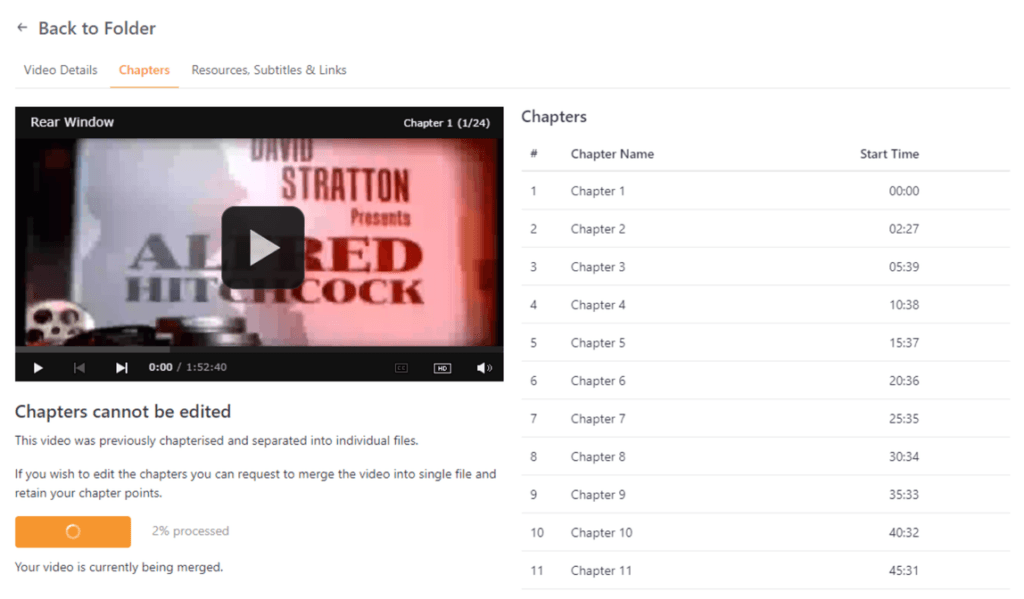
Merging Chapters
Some videos had previously been chapterised and separated into individual files.
You can now merge these chapters back into one file, which gives access to the following functions:
- Creating clips
- Uploading your own subtitles
- Editing the video
- Adding chapters to the video using Library Editor
After the video has been completely merged, your existing chapter points will be retained.

Why is ClickView and Exchange Content Linked?
When you migrate from Publisher, duplicates of ClickView and Exchange videos are removed.
This ensures up-to-date metadata, and no duplicate search results.
Admin Notes
We’ve added a new field called “Admin Notes” under every video in Library Editor, available on your own videos and linked ClickView videos. The data in these fields will not be searchable or displayed to teachers or students, but acts as a notepad for ClickView Administrators and Librarians.
If a video in your library was linked to the Exchange or a ClickView Library during the migration, we have pre-populated it with all of your previous Publisher metadata.

View in Publisher Archive
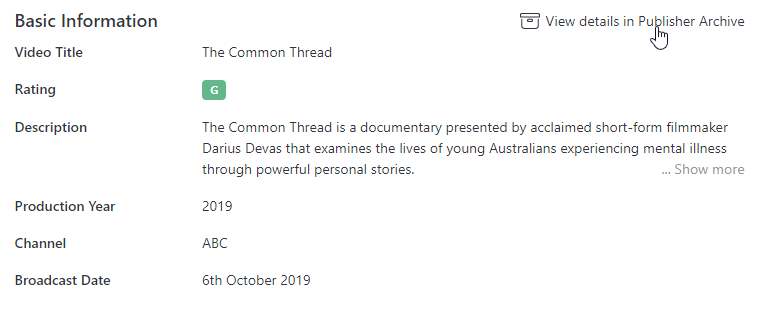
We’ve added a new button on the migrated video page that will show you that information. This allows you to view the metadata as it was displayed in Publisher.

Generate Report of Linked Videos
You can now generate a report to see which Exchange or ClickView video had been linked after migrating.

Thank you to everyone who has taken the time to provide us with feedback. We’re already working hard on another release of new features that will be coming towards the end of October.
If you have any ideas for new features or would just like to provide us some feedback, please feel free to get in contact with us at research@clickview.com.au.
Share to

Joe Pour
briefcase iconChief Product Officer
Experienced product leader with a strong background in engineering and building innovative products at scale.
Other posts
Want more content like this?
Subscribe for blog updates, monthly video releases, trending topics, and exclusive content delivered straight to your inbox.