
Reference any ClickView video with our new citation generator
Published on 3 min read

What’s new
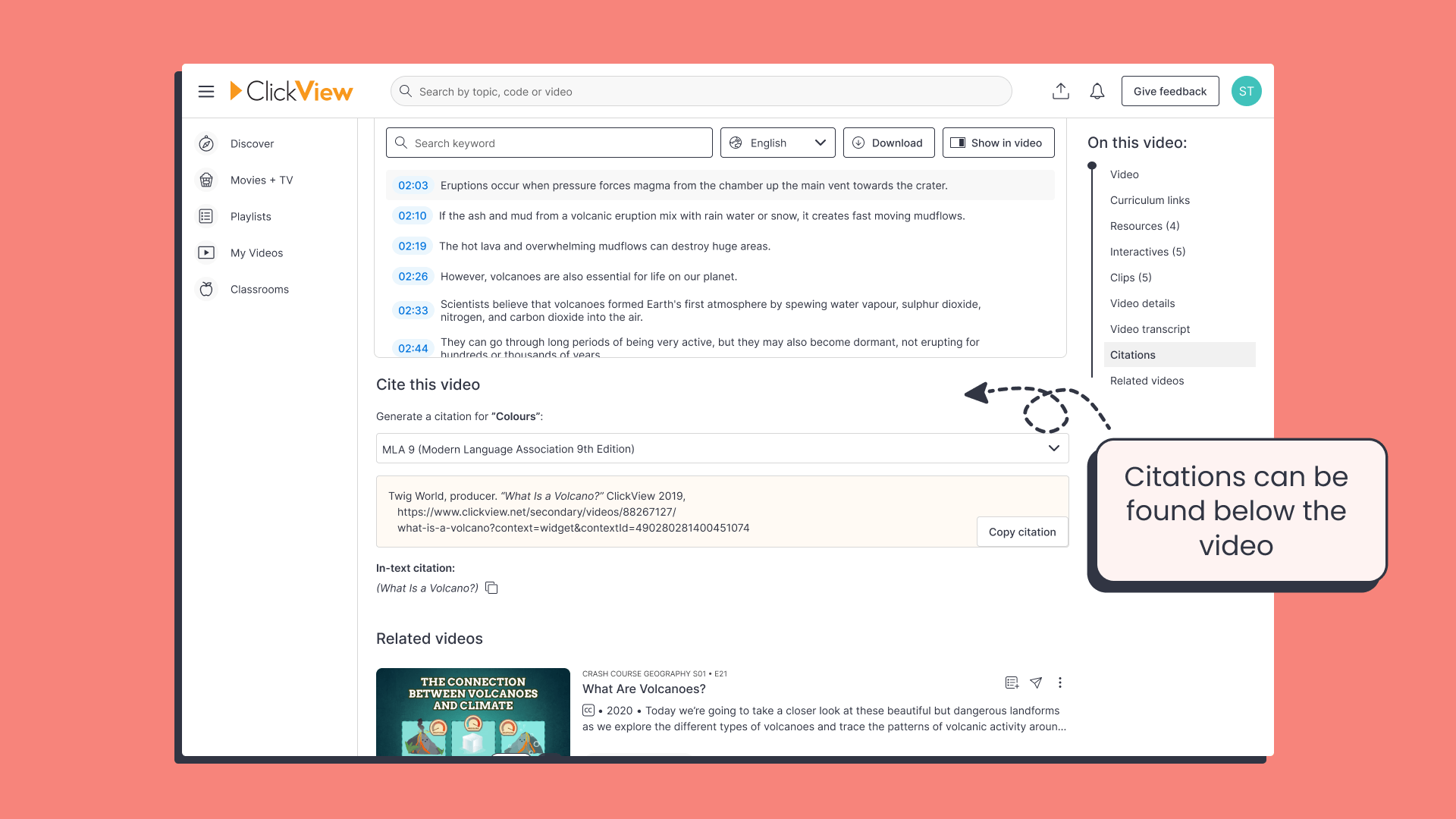
We’ve made it easy for your students to cite any video on ClickView! Using our new citation generator, students can easily credit ClickView videos in all popular citation styles.
This feature encourages students to strengthen research skills by tracing information back to reliable origins.
User feedback
This has been one of the most requested features. We’ve heard from teachers and librarians how important it is for students to learn how to correctly cite their sources. Especially at a time when misinformation is so widespread.
Now your students can cite videos accurately in a single click, making it easier to practice academic honesty and giving you more time to focus on teaching.
How it works
You will now see the citation generator under all ClickView videos, which allows you to:
- Select your preferred citation style (APA, MLA, Chicago, or any other supported format).
- Copy the citation in a ready-to-paste format.
- Use the citation whether your students are watching a video directly or receiving it as part of an assignment.
Simple and straightforward, your students can now access accurate and correctly formatted citations instantly.

Supported citation styles
We’re launching this feature with 7 citation styles:
- APA 6 – American Psychological Association 6th edition
- APA 7 – American Psychological Association 7th edition
- Harvard
- Harvard (Australian)
- MLA 8 – Modern Language Association 8th edition
- MLA 9 – Modern Language Association 9th edition
- Chicago
Benefits for students
Clear citation information helps your students go beyond just watching a video. It teaches students how to:
- Credit their sources and practice academic integrity.
- Strengthen research skills by tracing information back to reliable origins.
- Build confidence knowing their work is backed by credible evidence.
- Think critically about where knowledge comes from and why it matters.
Students aren’t just learning about the topics in the video. These skills also help them build information literacy and responsible research habits.
Benefits for teachers and librarians
With automatic video citations, you can now:
- Model academic integrity and prevent plagiarism in the classroom.
- Save time with ready-to-use source details for lesson plans and student projects.
- Support state standards requiring evidence-based research and proper source evaluation.
- Ensure equity, giving every classroom access to reliable, credible resources.
By making citations clear and accessible, you can focus more on instruction while empowering your students to learn the value of ethical and well-supported research.
Tips and tricks
Here are a few ways to make the most of the new citation feature:
- Show students how to use it early. Introduce the citation tool at the start of a project so students build good habits from the beginning.
- Use it everywhere: The citation tool works on full-length videos, short clips, and even videos with interactive quizzes.
- Promote critical thinking: With the rise of misinformation, your students gain essential media literacy skills and build stronger, evidence-based arguments while identifying fake news or AI-generated content.
- Tie it to standards. Many state and national standards call for source evaluation and evidence-based research. This tool helps check that box while also saving time.
What’s next
The new citation feature is already available on all ClickView videos. We’ll continue to expand supported formats, and we’d love your feedback. Let us know if there’s a specific citation style you’d like us to add so we can keep making ClickView better for everyone.
Share to

Joe Pour
briefcase iconChief Product Officer
Experienced product leader with a strong background in engineering and building innovative products at scale.
Other posts
Want more content like this?
Subscribe for blog updates, monthly video releases, trending topics, and exclusive content delivered straight to your inbox.