
What’s new with sharing videos in ClickView, based on your feedback
Published on 3 min read
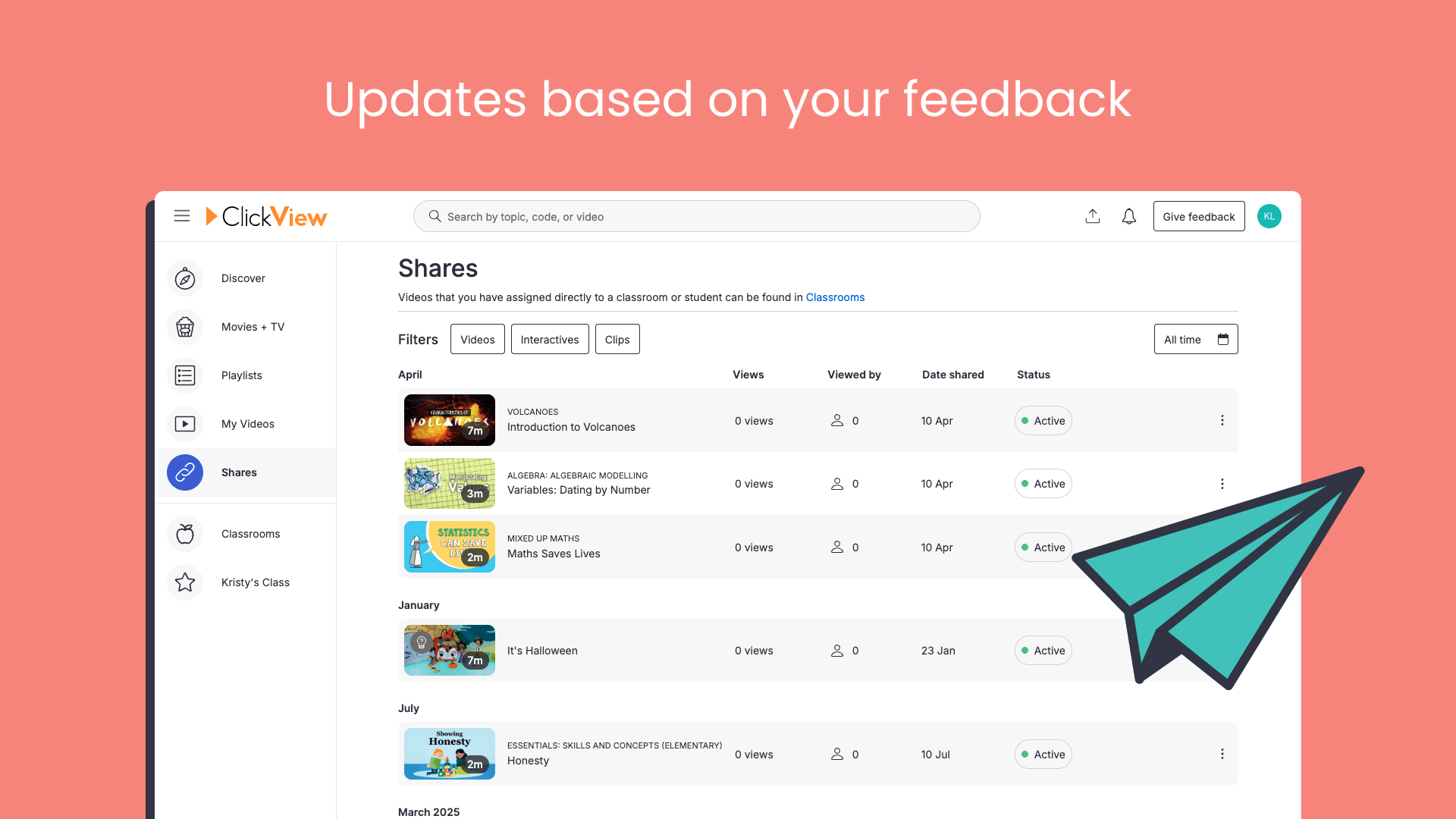
Since launching the new sharing experience in ClickView, we’ve been listening to your feedback and making improvements. Here’s what’s changed so far.
What’s new
- Date range filtering and video type filters. Find specific shares faster by filtering by date range or video type (Videos, Interactives, or Clips)
- Month-based grouping. Shares are now grouped by the month they were sent, replacing relative labels like “3 months ago”
- Multi-teacher class support. See assignments created by other teachers in your shared classrooms
- Split first and last names. Sort student lists and heatmaps by either first or last name
- Restored teacher controls for interactive videos. Re-share, print worksheets, add to playlists, and more when you attempt interactive videos yourself
Research and user feedback
These updates came directly from teacher feedback after the February launch. Many of you took the time to share what was and wasn’t working, and we’ve acted on it.
Finding shares took too long
Teachers told us that scrolling through the shares list to find a specific video was time-consuming, especially for older shares. There was no way to filter or search, and relative date labels (“3 months ago”) made it harder to pinpoint when something was shared.
We’ve added date range filtering, video type filters, a new “Date shared” column, and month-based groupings so you can track down exactly what you’re looking for.
Controls were missing for interactive videos
After launch, several teachers noticed they’d lost access to actions like re-sharing, printing worksheets, and adding to playlists when attempting an interactive video themselves. These are part of day-to-day workflows, so we’ve brought them back.
Open classrooms needed tidying up
Feedback highlighted a few friction points for students in open classrooms: unclear join instructions, the ClickView logo linking away mid-attempt, and a distracting “Use app” prompt. We’ve addressed all three to keep students focused.
What’s changed
Easier to find and organise your shares
You now have more control over your share list. Filter by date range or video type (Videos, Interactives, or Clips), and use the new “Date shared” column to see exactly when each share went out. Shares are grouped by month rather than relative time labels, so finding older shares is quick and simple.

Tidier options for expired shares
The “Share options” button no longer appears on expired shares. It wasn’t serving a purpose there, and teachers found it confusing, so we’ve removed it to keep things clean.
Full teacher controls restored for interactive videos
If you’re attempting an interactive video yourself, all your usual actions are back: re-sharing, printing a worksheet, adding to a playlist, and more.

Anonymous attempt names fixed on the heatmap
We found that anonymous student attempts were showing without names on the heatmap view. That’s now fixed, so your data displays correctly.

Clearer join instructions for open classrooms
We’ve improved the instructions students see when joining an open classroom, making it easier for them to get started without extra guidance from you.

Fewer distractions during open classroom attempts
The ClickView logo no longer links away from the page when students are mid-attempt in an open classroom. The “Use app” prompt is also hidden during attempts. Both changes keep students focused and in the right place.

Support for multi-teacher classes
If you co-teach or work across multiple classes with colleagues, you now have a full picture of what’s been assigned, not just your own shares. Teachers in shared classrooms see assignments created by other teachers, too.
First and last names are split in student lists and heatmaps
Student names are now separated into first and last name columns across your student list and heatmap. Sort alphabetically by either, which is particularly handy for larger classes.

Tips and tricks
- Use date range filters to quickly review everything you shared during a specific term or unit
- Filter by video type to see only Interactives when reviewing quiz-based assignments
- Sort by last name in the heatmap to match your class roll
- If you co-teach, check the shared classroom for a full view of all assignments, not just yours
We’re continuing to improve sharing in ClickView based on your input, so keep the feedback coming. If there’s something you’d like to see improved, let us know here.
Share to

Joe Pour
briefcase iconChief Product Officer
Experienced product leader with a strong background in engineering and building innovative products at scale.
Other posts

Want more content like this?
Subscribe for blog updates, monthly video releases, trending topics, and exclusive content delivered straight to your inbox.